


Word Tiles GO
4.7743.00 Reviews
App Specs
- Version
- 3.1.14
- Updated On
- License
- Free
- Downloads
- 100,000+
- Developer
- Gulliver's Games
- Categories
- Word
- Platform
- Android
Screenshots
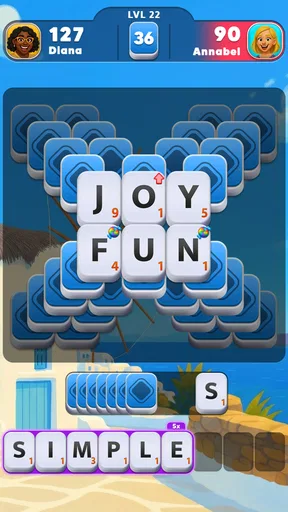
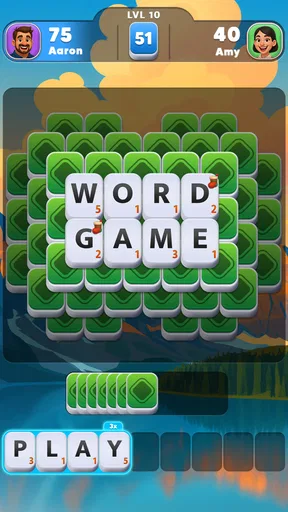
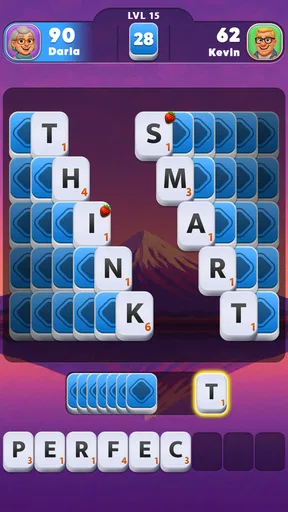
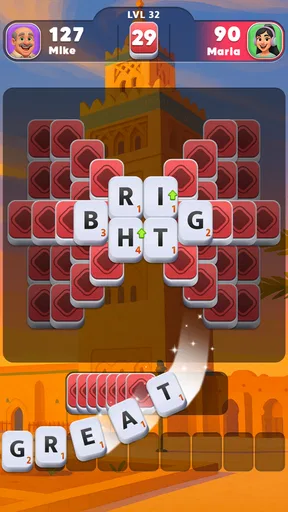


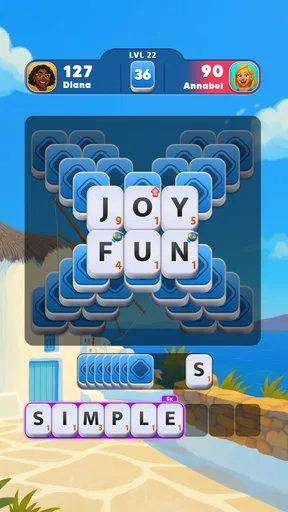
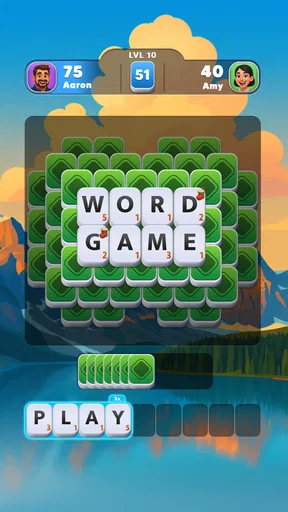
 Analysis by AppCompare
When I want a small puzzle to fill a quiet moment, I look for something that gives me a clear task without demanding a long setup. That is the appeal of Word Tiles GO: it turns word finding into a focused, tile-based activity, and its uncomplicated starting point makes it easy to try. I’d consider it for a short break, though its appeal depends on whether you enjoy working through word puzzles at your own pace.
Small goals make it easy to begin
The first goal is immediately understandable: find words from the letters and use them to fill the puzzle’s tiles. That gives each round a concrete finish line, which is more satisfying than simply searching for words with no visible purpose. I find that kind of structure useful when I have only a few minutes and want to make progress without learning a complicated set of rules first.
A practical way to approach a difficult board is to stop trying to spot every answer at once. I scan for short, familiar words first, then look again at the remaining letters and spaces. Filling part of the board can make the unresolved pattern easier to see. It is a simple habit, but it helps prevent random swiping from turning a relaxing puzzle into a frustrating guessing session.
Progress feels clearest at the level scale
The game’s progress is signaled by completing puzzles and moving onward. That steady loop suits players who like a series of manageable objectives more than a sprawling story or a complex collection of systems. I enjoy seeing a board go from partly solved to complete, especially when the last answer takes a little thought rather than arriving immediately.
The hint system is useful when I have genuinely run out of ideas, but I would treat it as a backstop rather than my first move. Before using one, I try changing my angle: focus on the empty spaces, reconsider a letter combination, or take a short pause and return. That keeps the answer-finding part of the game meaningful. If I lean on hints too quickly, I lose the small satisfaction that makes finishing a tough puzzle worthwhile.
Challenge should stay enjoyable, not become a chore
The puzzles become trickier as you progress, which gives the basic swipe-and-fill format room to grow. That gradual rise in difficulty is a good fit for people who want a gentle mental workout, but it also means the game may stop feeling effortless. When I hit a sticking point, I prefer to step away instead of tapping through in irritation; a word puzzle is more rewarding when I return curious rather than pressured.
There is a useful distinction between a puzzle that asks me to think and one that simply slows my progress. If a board feels hard, I give myself time to test different word possibilities before deciding I need a hint. Players who want a reliably easy, no-stall experience may prefer a simpler word search, while people who enjoy working through a gradually tougher sequence are more likely to appreciate this format.
Worth Reading Before You Choose

EA SPORTS FC Mobile 26 Is a Bigger Football Game, but It Takes Time

Flipboard Shows What News Apps Must Do Beyond the Feed

Switching to Android Auto Means Rethinking Your Driving Routine

Google Calendar Makes a Crowded Week Easier to Manage

Ludo King Makes the Most of the Minutes Between Plans

Baby Panda World Brings Quick Play to Modern Phones, but Its Game Library Feels Busy
Its pace is best for spare moments
I see this as a game for a coffee break, a quiet wait, or a few minutes before bed, rather than something that needs a long, uninterrupted session. Each completed board offers a natural stopping point. That makes it easier to fit into a day without turning every spare moment into a commitment, and it gives me a reason to put the phone down once I have finished the puzzle in front of me.
For a realistic example, I might open it while waiting for a friend who is running late, solve what I can, and leave the rest for later if I get interrupted. That is a better match for its bite-sized wordplay than starting when I need to concentrate on something else. The same focus that makes a puzzle satisfying can make it awkward to play while listening closely to someone or switching between several tasks.
How it compares with other word games
Compared with a word search, this asks me to build answers from the available letters and fit them into a board, rather than simply scan a grid for a visible word. Compared with a crossword, it feels more direct: I am not relying on clue-solving as the central activity. That makes it approachable for casual play, while players who specifically want cryptic clues, broad trivia, or a large shared competition may get more from a different kind of word game.
The social element can add another reason to play if friendly rivalry is part of the appeal. I would still judge the game first by whether I enjoy its solo puzzle loop; competition is a bonus, not a substitute for liking the boards themselves. If I prefer a completely private, solitary activity, I can focus on the puzzles and leave the social side aside.
Unleashing the Word Wizard Within
When I first dove into Word Tiles GO, I was hooked by the stunningly simple yet captivating design. It’s like your typical crossword puzzle had a makeover and came back all fresh and modern. The game is incredibly user-friendly, which means you can jump straight in without a steep learning curve. Perfect for those times when you just want to relax and let your mind wander.
Gameplay That Keeps You Coming Back
The premise is straightforward: swipe across the letters to form words and fill up the tiles. But don’t let the simplicity fool you. As you progress, the puzzles get trickier, and that’s where the real fun begins. The app challenges your vocabulary and strategic thinking, making it more than just a casual time-killer.
What I love most is the sense of accomplishment when you finally crack a particularly tough level. It’s like finding the last piece of a jigsaw puzzle. Plus, there’s a nifty hint system for when you’re totally stumped, which, trust me, you’ll need at some point.
The Social Element
Now, I’m all about solo gaming, but Word Tiles GO adds a social twist that’s hard to resist. You can connect with friends, challenge each other, and even see who’s the ultimate wordsmith. It’s a great way to add a layer of friendly competition and stay connected with your pals.
This makes it a better fit for friends who enjoy comparing their word skills than for someone seeking a formal team competition. I would use the challenge feature as an occasional nudge to revisit a puzzle, not as a reason to rush through it. A quick match of pride can make a familiar format feel more lively, but the main value still comes from figuring out the words yourself.
Visuals and Soundtrack
Visually, the game is a treat. The colors are vibrant without being overwhelming, and the interface is clean and intuitive. The relaxing background music and sound effects create a soothing environment that makes playing an enjoyable experience. It’s like having a mini retreat whenever you open the app.
That calm presentation works best when I want a low-key break, but it is not a reason to expect a deep audio or visual experience. If I am playing in a shared space, I can keep the volume low and still focus on the letter puzzle; the visual board carries the activity. I would choose another game if elaborate animation, a strong narrative, or action-heavy feedback were what I wanted from a mobile session.
Why Word Tiles GO Stands Out
In a sea of word games, Word Tiles GO shines brightly with its unique blend of challenge and relaxation. The app is regularly updated with new levels, so there’s always something fresh to tackle, keeping the experience alive and exciting. Plus, it's available on both Android and iOS, making it accessible to pretty much everyone.
For context, Gulliver's Games makes this free word game, which is rated for Everyone. It has an average rating of 4.6 from around 8.4 thousand ratings, with over 100 thousand installs. Those figures suggest it has found an audience, but they cannot tell me whether its particular swipe-and-fill rhythm will suit you. I would use the free entry point to decide that for myself before considering any optional spending.
The version is 1.6.32, and it requires Android 7.0 or later. In-app purchases range from $0.99 to $99.99 per item, so the free label does not mean every possible purchase is cost-free. I would be comfortable trying the core experience without buying anything first. If you are setting up a device for a child, the Everyone age rating is helpful context, while the purchase range is a good reason to keep an eye on purchase settings.
One practical trade-off is that a gradually tougher sequence can be satisfying when I have time to think, but less appealing when I only want instant, effortless play. A quick word search is a better choice if I want to spot answers without building them from letters; a crossword is better if clue interpretation is the main pleasure. Here, the draw is the middle ground: approachable word construction with boards that ask for more attention as I advance.
Another thing worth mentioning is the offline mode. It’s a lifesaver for those moments when you’re stuck without Wi-Fi but still crave a bit of wordplay.
That makes it handy for a commute or a place with unreliable reception, as long as I have already got the game ready to play. I would not assume that every social function works without a connection; offline play is most useful for the solo puzzle itself. If I know I will be out of reach, I can open a board beforehand and avoid relying on a friend challenge to fill the time.
Final Thoughts
All in all, Word Tiles GO is a fantastic app that’s well worth a spot on your device. Whether you’re a seasoned word game veteran or a curious newbie, this app has something for everyone. It’s engaging, visually appealing, and offers just the right amount of challenge to keep you coming back for more.
So, if you’re looking for a way to flex those mental muscles and unwind at the same time, give Word Tiles GO a whirl. You might just find yourself as hooked as I am!
My recommendation is strongest for someone who likes clear puzzle goals, enjoys finding words from letters, and is happy to let difficulty rise at a measured pace. It is less suited to players who want a clue-rich crossword, a story-led campaign, or constant high-energy competition. I would start with a few boards during a low-pressure break, save hints for a genuine block, and see whether completing each tile gives you the satisfying rhythm it gives me.
Pros
- Challenging puzzles enhance cognitive skills.
- Beautiful graphics with a calming theme.
- Offline mode available for uninterrupted play.
- Regular updates with new levels and features.
- User-friendly interface for easy navigation.
Cons
- In-app purchases can be pricey.
- Limited free hints without purchasing more.
- Ads may interrupt gameplay frequently.
- Some puzzles can be overly complex.
- Requires substantial storage space.
FAQs for Word Tiles GO
What is Word Tiles GO and how does it work?
Word Tiles GO is a word puzzle game that challenges players to form words from a grid of letter tiles. The objective is to swipe through the tiles to create words, earning points for each correct word. The game offers various levels of difficulty and themes, making it suitable for all ages and skill levels.
Is Word Tiles GO free to download and play?
Yes, Word Tiles GO is free to download and play on both Android and iOS devices. However, the game offers in-app purchases that provide additional features, such as hints and ad-free gameplay. While these purchases enhance the experience, they are optional and not necessary to enjoy the game.
Are there any ads in Word Tiles GO?
Yes, Word Tiles GO includes advertisements that may appear between levels or during gameplay. Ads help support the developers and keep the game free for players. To remove ads, players can opt for in-app purchases. The ad-free version offers a smoother and uninterrupted gaming experience.
What are the device requirements for Word Tiles GO?
Word Tiles GO requires Android version 5.0 or higher and iOS 10.0 or later to run smoothly. The game is compatible with most smartphones and tablets. It's recommended to have a stable internet connection for downloading and accessing certain features, though offline play is also available.
Can I play Word Tiles GO offline?
Yes, Word Tiles GO can be played offline, allowing users to enjoy the game without an internet connection. However, some features, such as daily challenges and updates, may require online access. Playing offline is ideal for travel or when connectivity is limited.


